

Let's imagine you are using a web scraper you build to extract data from a website, half way through the operation, you stop collecting data. Maybe your code broken or you encountered an edge case. After hours of trying to figure out, you find out that your scraper got blocked from scraping that website.
We have all been there and have had to learn it the hard way, if you do not want to go through the trouble of figuring out how to avoid this situation then you are in the right place.
In this article, I combine all the knowledge we have accumulated from the 10 plus years of being in the web scraping niche.
What Are “Random User Agents” (User-Agent Rotation)?
A random user agent is a web scraping technique of regularly changing the user agent string your scraper sends to the webpage, this can be done by iterating through a defined list of real browser identities.
Interested to know how your browser appears to other site, check out this tool called Whatu.
Why is user-agent rotation required?
Instead of using a constant User-Agent (which could get flagged after many requests), your scraping script picks a new, random string for each request or each session. This is also know as spoofing. This technique helps as it makes each request appear as if it’s coming from a different browser or device, which reduces the chance of detection by Anti-bot system.
For example, one request might appear as Chrome on Windows, the next as Firefox on Mac, then Safari on iPhone, and so on. From the website’s perspective, it sees traffic from various clients instead of a single script.
In a web scraping context, randomizing user agents helps avoid simple anti-scraping mechanisms that block or throttle repetitive requests from the same User-Agent.
What is a User Agent?
If you are new to web scraping, you may have not yet heard about a user agent. In simple terms, it’s a line of text that identifies the software sending a request like a browser or an automated bot.

| Mozilla | MozillaProductSlice. Claims to be a Mozilla based user agent, which is only true for Gecko browsers like Firefox and Netscape. For all other user agents it means 'Mozilla-compatible'. In modern browsers, this is only used for historical reasons. It has no real meaning anymore |
| 5.0 | Mozilla version |
| Macintosh | Platform |
| Intel Mac OS X 10.15 | Operating System: OS X Version 10.15 : running on a Intel CPU |
| rv:143.0 | CVS Branch Tag The version of Gecko being used in the browser |
| Gecko | Gecko engine inside |
| 20100101 | Build Date: the date the browser was built |
| Firefox | Name :  Firefox Firefox |
| 143.0 | Firefox version |
Confused about what the above mean?
Each element in a user agent string conveys certain information about your browser software.
Since there’s no single standard, web browsers use their own formats, often inconsistent. You can use a tool called WhatIsMyBrowser.com that will parse and interpret what each part of your user agent means.
Why Use Random User Agents for Web Scraping?
When you are web scraping at a large scale, one common problem you will encounter is avoiding anti-bot systems. Generally, web scraping is the first part of a larger business process, so it is important to make sure your web scraping bot is not affected by these systems.
Here are the key reasons developers rotate User-Agents when scraping:
- Avoid Bot Detection: Many websites use incoming User-Agent strings to detect if the client is a browser or an automated script. When the website receives repeated requests with an uncommon or static User-Agent then it can trigger blocks. Using rotating User-Agents helps prevent this by mimicking various legitimate browsers.
- Bypass Basic Blocks and Filters: Some sites outright block known bot user agents or outdated browsers. Others serve content only to certain UAs (e.g. a “mobile-only” site). Randomizing lets you sidestep such restrictions by presenting an allowed identity each time.
- Distribute Load Across “Identities”: If one User-Agent starts getting throttled or flagged, switching to others can keep you scraping. It’s like not putting all your requests behind one persona.
- Reduce Fingerprinting Consistency: User-Agent is one of many data points for fingerprinting, so by changing it frequently trackers have a harder time pinning all your requests to a single profile, enhancing anonymity. For instance, studies have shown User-Agent rotation can significantly reduce a client’s fingerprint uniqueness.
- Simulate Real Traffic Patterns: User-agents help mimic normal web traffic, it’s unlikely that hundreds of consecutive requests all come from the exact same browser instance. By using a variety of User-Agents, your scraping activity looks more organic, as if multiple users/devices are browsing, thus preventing getting blocked by Anti-bots.
How to Rotate User Agents in Your Web Scraper?
When it comes to implementation of random user agents rotation, there are several ways used by Developers, and it usually involves maintaining a list of user-agent strings and coding your scraper to choose one per request.
Here’s how you can set up your random User-Agent rotation step-by-step:
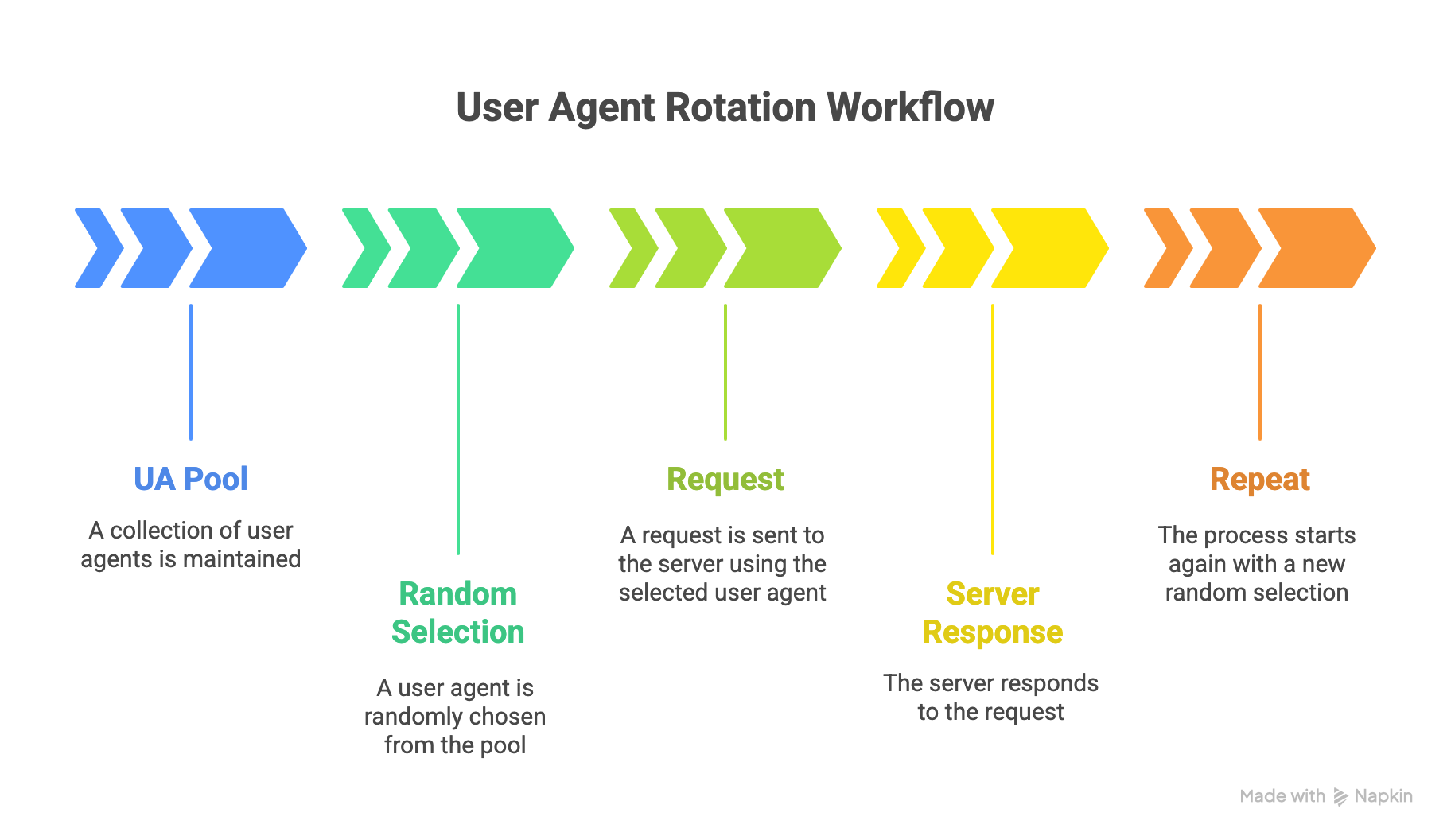
- Collect a Pool of Real User-Agent Strings: First, gather a list of common, up-to-date user-agent strings from real browsers like Chrome, Firefox, Safari, Edge on various devices. You can obtain these from your own browser’s developer tools or public lists. The key is to use legitimate strings (e.g., Chrome 114 on Windows 10, Firefox on MacOS, a mobile Safari, etc.), not fake or rare ones.
- Load or Store the User-Agent List in Your Scraper: Then, incorporate this list into your code. For a small project, you might hard-code an array of strings or read from a file. For larger projects, consider a dedicated library or API that provides random UAs. For Example: the Python library
fake-useragentcan generate a random realistic UA for you. - Pick a Random User-Agent for Each Request: Before making an HTTP request in your scraper, randomly select one of the strings from your pool. Most programming languages have a randomization function to help with this. Set the
User-Agentheader of your HTTP request to that string. For instance, in Python withrequests, you’d do:headers = {"User-Agent": choice(ua_list)}and thenrequests.get(url, headers=headers). - Maintain Consistency When Needed: If your crawler uses sessions or logs into a site, it’s often wise to keep the same User-Agent for that session (so as not to change identities mid-visit). You might randomize per new session rather than every single request in such cases. Configure your rotation strategy (per request vs. per session) based on the target site’s behavior.
- Test and Refine: Run your scraper with rotation enabled and monitor the outcomes. If you still get blocked, consider improving your pool (maybe your UAs are outdated or too few) or combine with other tactics (like proxies, which we’ll discuss next). Ensure the user agents you send don’t break the site’s rendering; if a certain UA causes issues (e.g., mobile UA on a desktop-only site), adjust your list or rotation rules accordingly.
What are Some Drawbacks of Using a Random User Agent?
While rotating user agents is a common and effective way to disguise your scraper’s identity, it’s not a perfect solution. In fact, if it’s done incorrectly or used in isolation, random user-agent rotation can cause more problems than it solves. Let’s look at a few common drawbacks developers should keep in mind.
1. Inconsistent Behavior Across Requests
Every browser and device behaves a little differently. When you constantly change your user agent, the websites you’re scraping might serve slightly different versions of a page, desktop vs. mobile layouts, or region-specific content. This inconsistency can lead to mismatched data or broken selectors, especially if your scraper isn’t designed to handle layout variations. For instance, scraping a site with both mobile and desktop user agents mixed together can produce inconsistent datasets that require extra cleaning later.
2. Unnatural Request Patterns
Ironically, changing your user agent too frequently can also look suspicious. Real users don’t switch browsers every few seconds, but scrapers often do when randomization is implemented poorly. Some websites can detect this unnatural behavior and flag it as automated traffic. A smarter approach is to rotate user agents in a more controlled way, for example, keeping the same agent for a browsing session before switching.
3. Compatibility and Rendering Issues
Not all user agents are created equal. Some correspond to browsers that handle web standards differently or may request different resources. If your scraper claims to be an older browser or a mobile app, the site might send you stripped-down or incomplete content. This can result in missing data, broken HTML structures, or unexpected redirects. Developers often find it safer to limit their rotation to a set of well-tested, modern desktop user agents.
If you are wondering how to check if a website allows for web scraping, we have an in-depth article about it.
4. Added Complexity in Scraper Management
Implementing and maintaining user-agent rotation adds another layer of complexity to your scraping system. You’ll need to maintain an updated list of valid user agents, handle rotation logic, and troubleshoot when requests fail due to header mismatches. If you’re also managing proxy rotation, cookies, and sessions, the combined setup can quickly become difficult to maintain. Using an automated service that manages this intelligently can save a lot of development time.
5. False Sense of Security
Finally, randomizing your user agent alone won’t make your scraper undetectable. Many modern anti-bot systems rely on a combination of signals including IP address reputation, JavaScript execution, mouse movement, and even TLS fingerprinting. If you focus only on user-agent rotation and ignore these other layers, your scraper may still get blocked. In other words, it’s one useful technique among many, not a silver bullet.

Why Should Large Enterprises Use Random User Agents?
Web scrapers are used by both small and large enterprises, whether for market intelligence, price monitoring, lead generation, or competitive analysis, as you scale your scraper staying undetected while scraping at scale is important.
Random user agents can help with solving this problem. While smaller scrapers might get by with a single browser signature, enterprise-grade operations face higher traffic volumes and tougher anti-bot systems.
If you are a large organizations, here is how you can benefit from using random user agents:
1. Scale Amplifies Detection Risk
When an enterprise scraper makes thousands or even millions of requests a day, patterns emerge quickly. If all those requests share the same User-Agent string, they can be easily detected and blocked. By using random user agents you can make those signatures look like natural behavior so the traffic looks more like it’s coming from many different browsers and devices. This simple change can reduce the likelihood of large-scale IP bans and improve data collection reliability.
2. Protects Data Pipelines from Downtime
Inconsistent or blocked scraping operations can disrupt critical business workflows, especially for teams that depend on timely data for analytics or reporting. By rotating user agents, enterprises introduce an additional layer of resilience into their data pipelines. Even if a few requests are flagged or blocked, others continue to flow smoothly under different browser identities, keeping the overall operation stable and reducing costly interruptions.
3. Avoids Wasted Infrastructure Resources
Enterprise scrapers typically run on distributed systems, sometimes across dozens of servers or regions. If those servers share the same static user agent, they can all be blacklisted at once. That means paying for cloud compute, proxies, and bandwidth that return nothing. Randomizing user agents ensures that traffic is spread out across multiple identities, which helps maintain high success rates and lowers operational waste.
4. Enhances Data Quality and Coverage
Many enterprise use-cases such as scraping real estate data requires pulling data from websites that tailor their content based on device type or browser. Random user agents allow enterprises to collect more comprehensive datasets, for example, comparing how a site’s content differs between mobile and desktop experiences. In sectors like retail or travel, where pricing and layout often change depending on user device, having multiple user perspectives can be a strategic advantage.
5. Complements Enterprise-Grade Anti-Detection Systems
Most large organizations combine user-agent rotation with advanced tools like proxy management, request throttling, and headless browser automation. Random user agents act as one piece of that broader anti-detection puzzle, helping these systems mimic authentic human browsing patterns. Used together, these techniques make enterprise web scraping both more scalable and more compliant with website limitations.
At DataHen, we know that at enterprise scale, reliability matters as much as reach. That’s why our managed web scraping infrastructure automatically rotates user agents, proxies, and session headers to simulate genuine browser traffic. It ensures your large-scale data collection runs smoothly, without triggering anti-bot defenses or wasting valuable infrastructure time.
Best Practices for Effective User-Agent Rotation
So far we have learnt about user agent rotation, why you need it, and how to implement it.
But let's talk about how to use it correctly so that you can get the most out of it.
Consider these best practices when using random User-Agents in scraping:
- Use Authentic, Up-to-Date UA Strings: Always use user-agent values that correspond to real browsers and devices. Avoid made-up combinations (e.g., “Safari on Windows” which doesn’t exist) or extremely old browser versions that almost nobody uses like Internet Explorer. Regularly update your list to include new browser releases.
- Match User-Agent with Browser Behavior: Advanced anti-bot systems might check if your declared User-Agent matches your scraper’s behavior. For example, if you claim to be a mobile browser but immediately parse a heavy desktop page or exhibit no touch events (in headless browser automation), it could raise flags. So, try to fetch content appropriate for the UA (or just stick to desktop UAs if you’re scraping desktop sites).
- Rotate Frequency Wisely: Rotating on every single request might not always look natural. In many cases it’s fine, but if your scraper navigates through multiple pages as one “user,” consider staying consistent within that flow. For instance, you might rotate per new IP or per new session/login to mimic one user’s browsing session. Choose an interval that makes sense rather than purely random timing.
- Don’t Forget Other Headers: A different User-Agent alone can help, but don’t ignore other HTTP headers. Ensure your scraper also sends typical headers (Accept-Language, Accept, Connection, etc.) that a real browser would. A mismatch between a legit-looking User-Agent and other missing headers can be a giveaway. Some libraries or services handle full header profiles.
- Combine User-Agents Rotation with IP Rotation (Proxies): Critically, user-agent spoofing is not a substitute for proxy rotation. It masks who you are (client software), but not where you are (IP address). We discuss this next – but in short, always use proxies or other means to vary your IP in conjunction with UAs for the best anti-block results.
- Monitor and Adapt: Keep an eye on how target websites respond. If you notice blocks or challenges, experiment with different sets of UAs or rotation strategies. Sometimes one particular agent string might be getting flagged (maybe it’s associated with bots or is outdated). Remove or replace anything that consistently fails.
Conclusion: Scraping Smarter with Random User Agents
We learnt the importance of random user agent rotation for web scraping. By changing the meta data of your scraper, you can reduce the chances of getting blocked or flagged by anti-scraping systems.
Remember, though, that it works best in tandem with other measures like IP rotation, sensible request rates, and handling of other fingerprints.
Finally, consider that maintaining your own rotation systems (for both User Agents and proxies) can be tedious. If you’d rather focus on data and let someone else handle the cat-and-mouse game of anti-scraping, DataHen’s web scraping services are designed to do exactly that.
We at DataHen automatically handle user-agent rotation, IP proxy management, and other anti-bot countermeasures for our clients, so you get reliable results without worrying about the behind-the-scenes technicalities.
👉NEXT ARTICLE: How to Bypass IP Bans