
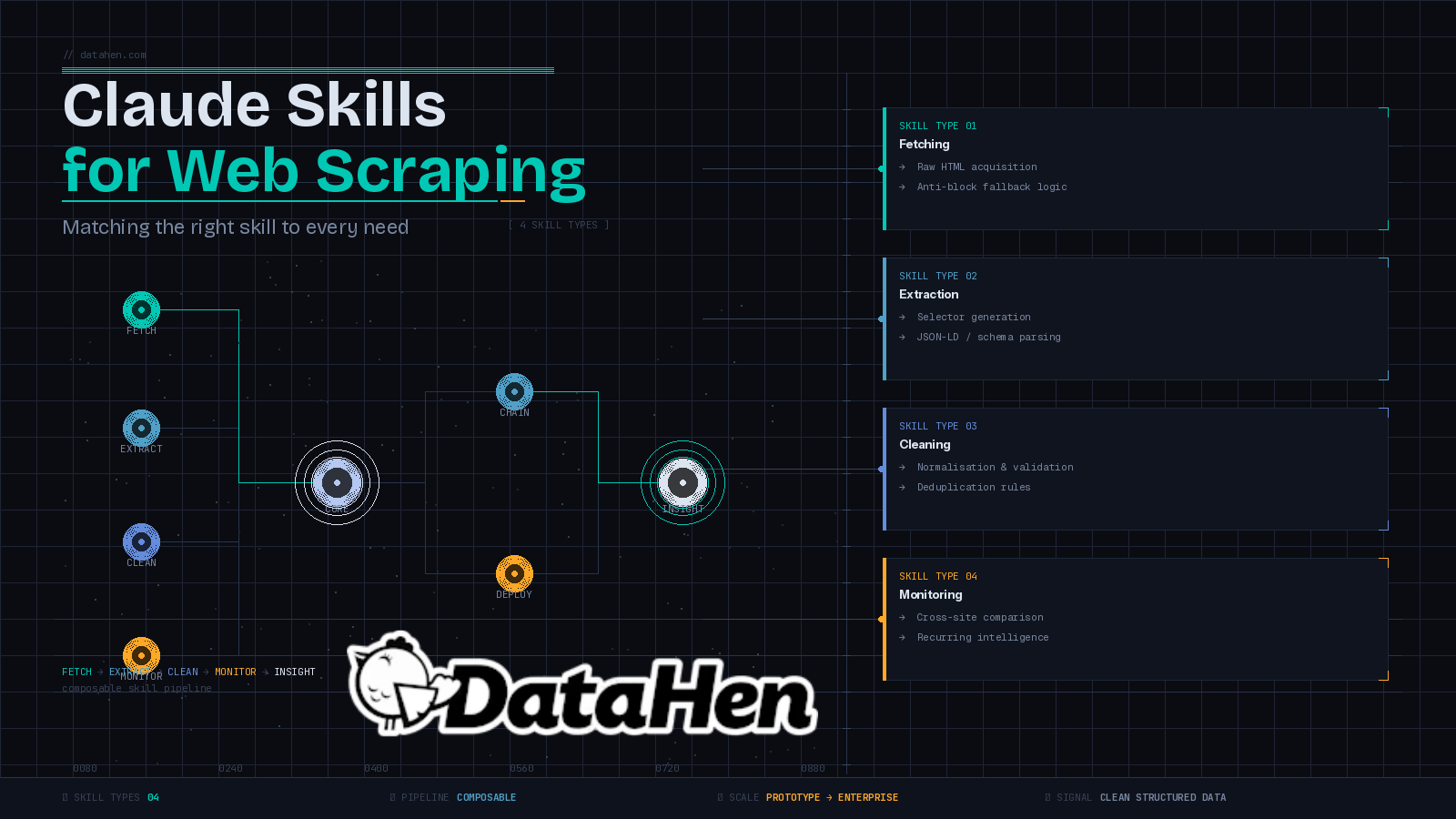
Most teams come to Claude with a scraping problem and leave with a general answer. Claude can describe how to build a scraper, generate some boilerplate, and explain how a target site is structured but it can't fetch pages, run Python scripts, or validate selectors on its own. Not without the right setup.
That's the gap Claude skills fill. A skill is a structured instruction set a SKILL.md file that teaches Claude when and how to use a specific tool or script, automatically, as part of a live workflow. The result is something more useful than a chat assistant: a purpose-built scraping environment where Claude orchestrates each step.
The catch is that not all scraping needs are the same. The skill you'd build for a one-off product research task looks nothing like the skill you'd build for recurring competitor price monitoring or automated data cleaning. This post breaks down the main types of data you can extract with web scraping, the Claude skills for web scraping that match each need, and where skills stop being enough.
What Are Claude Skills for Web Scraping?
How a skill works
A Claude skill is a folder containing a SKILL.md file. That file tells Claude what the skill does, when to activate it, and exactly how to execute it including which scripts to run, what arguments to pass, and how to handle failures. Skills give Claude new capabilities that trigger automatically based on context and persist throughout the conversation, which means you can query or refine the output without switching tools or re-explaining your setup.
That persistence is what makes skills different from one-off prompts. You build the skill once. Claude uses it whenever the context calls for it. Every instruction is reusable, consistent, and easy to adjust you change a markdown file, not a codebase.
How is a scraping skill different from an MCP server?
An MCP server is a persistent, broadly-applicable integration the kind of tool a company ships to connect its product to multiple AI clients at once. A skill is leaner. It's a focused instruction set you own, version, and adjust on the fly. If a target site changes its structure and your extraction logic needs updating, you edit a markdown file and move on. You don't redeploy anything.
Skills are also composable. A fetching skill hands off raw HTML to a parsing skill. A parsing skill hands off structured output to a cleaning skill. Each piece does one job well, and Claude coordinates the handoffs between them. If you've been exploring free web scraping tools and wondering where skills fit in the broader stack, they sit above the tool layer, Claude is the coordinator, the skill is the instruction manual.
What Kinds of Web Scraping Needs Do Teams Actually Have?
Before building any skills, it's worth being clear about what you're actually trying to do. Most scraping needs fall into a few categories, and mixing them up leads to overbuilt workflows or skills that don't hold up under real conditions.
One-off research vs. recurring data collection
Exploratory scraping is grabbing product data from a handful of pages to validate a hypothesis, it is a different problem from running a daily pipeline across hundreds of competitor URLs. One-off tasks can tolerate manual steps and some ambiguity. Recurring jobs need reliability, structured output, and failure handling built in from the start.
Simple HTML vs. JavaScript-heavy pages
Static pages are fast to work with. JavaScript-rendered pages require a browser to execute scripts before any content is accessible. A skill designed for static HTML will fail entirely on a single-page application. Know what you're targeting before you build anything.
Small-scale vs. production-grade pipelines
A skill-based workflow in Claude works well for prototyping, targeted extraction, and data validation. At scale, thousands of URLs, multiple markets, real-time monitoring, you need more infrastructure. That line is real, and we'll come back to it.
Skill Type 1: Data Fetching Skills
A fetching skill handles the first step of any scraping pipeline: getting the raw HTML into the conversation. This sounds simple. It's where most lightweight setups first run into trouble.
What this skill does and when to reach for it
The skill points Claude to a script that takes a URL as input, retrieves the page, and returns the HTML directly into the chat session. From there, Claude can inspect the structure, pass it to a parsing skill, or start generating selectors, all without leaving the conversation.
The common mistake is building a fetcher that assumes every request will succeed. A well-designed fetching skill uses a two-step fallback: a lightweight HTTP client for standard requests, with a proxy-backed API as the fallback when a site returns a blocked status. If both attempts fail, the skill should surface the failure immediately rather than silently dropping the URL and continuing. A pipeline that drops failed URLs without telling you produces incomplete data and you may not catch it until you're looking at gaps in your output.
How to build fallback logic into your fetcher
The fallback logic lives in the script the skill calls, not in the SKILL.md itself. Your SKILL.md just needs to instruct Claude to check the response status, re-run with the fallback flag when blocked, and report clearly if neither attempt succeeds.
Reliable fetching also means thinking beyond the request itself. Rotating user agents is one of the most effective ways to stay under the radar during automated data collection, it belongs in your fetching script as a baseline, not something left for Claude to improvise on each run.
Skill Type 2: Extraction and Parsing Skills
Once you have the raw HTML, you need to pull the data out cleanly. Extraction skills handle this step, and the right approach depends on how the page is structured.
Selector generation skills
The manual approach is to open DevTools, inspect the DOM, write CSS or XPath selectors, and test them. Claude can bypass this entirely by reading raw HTML and extracting structured data without any pre-written selectors. For one-off tasks, that's fine. But scrapers that need to run repeatedly require stable, stored selectors, not logic that gets re-derived from scratch each time.
A selector generation skill takes a snippet of the page's HTML source and outputs multiple selector options for each target data point, ordered by reliability. If the primary selector breaks after a site redesign, you have backups queued up. That's the difference between a scraper that survives layout changes and one that requires manual intervention every few weeks.
Hidden structured data extraction skills
A large share of modern websites store their most important data in JSON-LD schema tags or other metadata formats embedded in the page source, product prices, review counts, event details. This data is usually far cleaner and more stable than anything visible in the HTML. Search engines depend on it, so sites rarely change the schema structure even when they redesign the frontend.
A structured data extraction skill targets this metadata directly, ignoring the DOM entirely. The output is a clean JSON object with no selector logic required. When this approach is viable, it's faster and more reliable than any selector-based method, and it dramatically reduces how often your scrapers break.

Skill Type 3: Data Cleaning and Validation Skills
Scraping gets you raw data. Raw data is rarely what you actually need to use.
Why raw scraped data usually isn't ready to use
Price fields come back as strings with currency symbols attached. Product names carry trailing whitespace or inconsistent capitalization. The same item shows up under three slightly different names across three competitor sites. Dates appear in four different formats. If this goes directly into analysis or a database, you'll get unreliable outputs downstream.
Data cleaning covers normalization, deduplication, and validation, the steps that convert a raw extract into something usable. Skipping it doesn't save time. It pushes the problem to wherever you're relying on the data to be clean.
What a data cleaning skill handles automatically
A cleaning skill takes structured output from a parsing skill and applies a consistent set of transformations: strip currency symbols and whitespace, normalize text casing, fill or flag missing required fields, deduplicate rows by a defined key. You define the rules once. Claude applies them on every run.
The skill can include validation logic too, checking that a scraped price falls within a plausible range, that a URL is well-formed, or that a date field matches the expected format. Catching bad data at this stage is significantly cheaper than catching it after it's been stored or acted on. It also builds trust in the pipeline. When data quality checks are embedded in the workflow, your team stops second-guessing every extract.
Skill Type 4: Monitoring and Comparison Skills
This is where Claude skills start replacing work that used to require dedicated tooling.
Cross-site comparison workflows
A monitoring skill sequences multiple fetches across competitor URLs, routes each through the extraction skill, and combines the structured output for Claude to analyze. You can pull data from several competing sites in a single session and immediately ask Claude to compare pricing, flag availability gaps, or identify schema differences between them.
That last part is reasoning about the collected data in the same session where you collected it and this is what makes this genuinely different from traditional scraping. You're not exporting to a spreadsheet and switching contexts. The extraction and the analysis happen in one place, and you can ask follow-up questions or drill into specific discrepancies without re-running anything.
How Do You Set Up a Recurring Monitoring Skill?
Skills in their current form are best suited for triggered, on-demand monitoring not fully autonomous scheduled pipelines. You invoke the skill when you want a comparison, review the output, and decide what to act on. For teams that need daily automated monitoring across large URL sets, the skill provides the template and validates the logic. The actual scheduling and storage belong in a proper pipeline built around it.
The skills approach is also well-suited for stakeholder-facing workflows. A product manager or pricing analyst can paste a URL and get clean, structured output explained in plain language, no terminal, no API key management, no setup overhead on their end.
When Should You Chain Claude Skills Into a Pipeline?
Manual chaining vs. embedded logic
The simplest chaining approach is manual: trigger each skill in sequence, review the output at each step, and decide whether to continue.
Fetch → Extract → Clean → Compare.
This gives you full visibility and is useful when you're working with an unfamiliar site or validating a new data source for the first time.
For tasks you run repeatedly, you can embed handoff logic directly into the skill instructions. Tell Claude that if no JSON-LD schema is detected, it should automatically pass the HTML to the selector generation skill. This reduces the number of manual prompts and keeps the workflow moving. In practice, most setups end up as a mix: new data sources get manual review, established sources run with embedded logic.
Where Claude skills hit their ceiling
Claude skills work well for prototyping, validation, and moderate-volume extraction. They hit their limit when you need handling pagination at scale across thousands of URLs, real-time monitoring, or consistent structured delivery across multiple markets.
Without purpose-built scraping infrastructure behind them, LLMs can fail on JavaScript-heavy pages, return incomplete data, or misread dynamic content entirely. The skill can describe the task with precision but the underlying execution needs more than Claude can provide on its own. Production-grade data collection requires JavaScript rendering, retry logic, and consistent structured output that plain skills alone can't reliably guarantee at scale.
Conclusion
Claude skills for web scraping give you a practical, flexible framework for fetching, extracting, cleaning, and comparing data at a manageable scale. If you're prototyping a pipeline, validating a new data source, or running targeted competitive analysis, the right set of skills will save you real time and reduce the manual work between raw pages and usable data.
But skills have a scope. One global food delivery company came to DataHen needing accurate pricing and product availability data across 28 countries, updated consistently, delivered directly to their analytics team. That kind of operation needs purpose-built data pipelines with infrastructure for scale, reliability, and structured delivery, not a set of markdown files and a chat session.
When your scraping needs grow beyond what Claude skills can reliably handle, DataHen can help. We build large-scale, custom web scraping pipelines for businesses that need clean, structured data at volume, on a schedule, across markets, ready to use. Get in touch with the DataHen team to talk through what your data collection setup actually requires.